Amazon Product Image Requirements: The 2026 Listing Architecture Guide
A definitive technical breakdown of Amazon product image requirements in 2026. Covers RGB 255 pure white mains, 1600+ px zoom resolution, 85% frame fill rules, 7-image gallery architecture, and search suppression fixes.
Amazon's search algorithm and catalog ingestion systems enforce strict technical standards for product listings. If your primary photo fails even a single parameter—such as an off-white halo of RGB(250, 250, 250) or a product filling only 75% of the frame—your ASIN risks silent search suppression, removal of the Buy Box, or lower organic rankings across mobile search feeds.
This guide provides a comprehensive breakdown of Amazon product image requirements for 2026, covering technical specs, pixel tolerances, the 7-image conversion architecture, and how to resolve common suppression triggers.
- Technical requirements cheat sheet
- Main image (MAIN) vs. secondary gallery rules
- The 7-image listing conversion architecture
- Common search suppression triggers & how to fix them
- Automating compliance with neural workflows
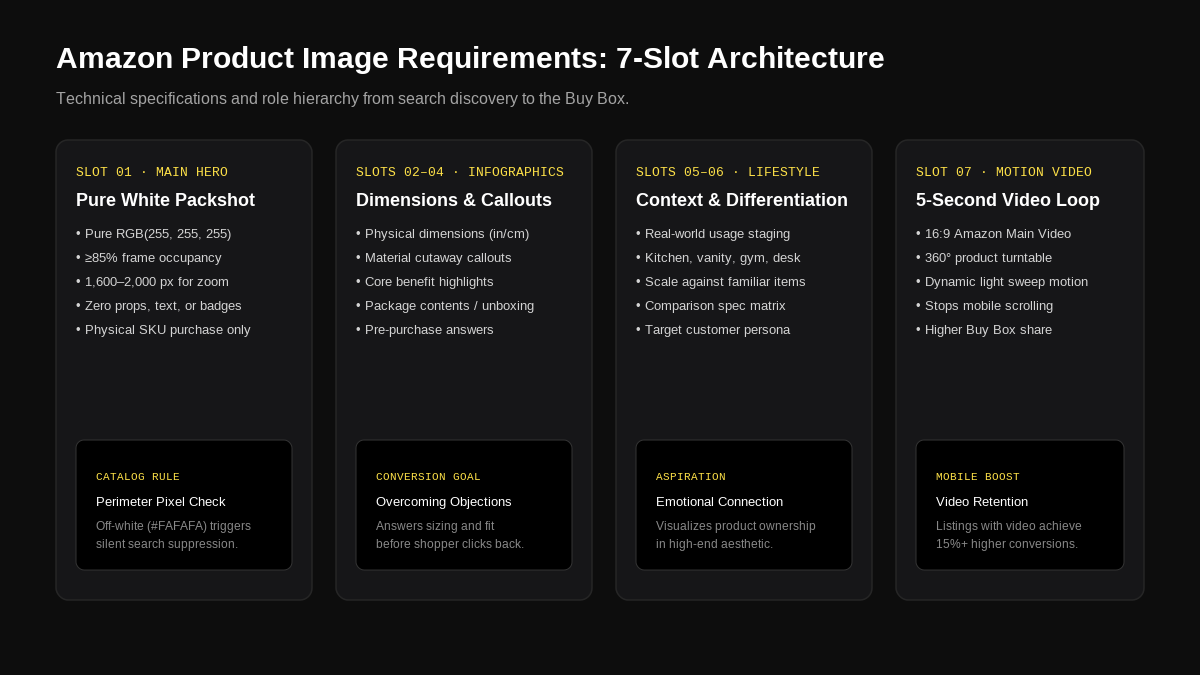
Amazon product image requirements: 7-slot listing architecture and compliance rules.
Technical requirements cheat sheet
Before uploading any asset to Amazon Seller Central or Vendor Central, verify your files against the mandatory platform specifications below.
Swipe sideways to see every column
| Parameter | Specification | Compliance notes |
|---|---|---|
| Main image background | Pure white: RGB(255, 255, 255) / #FFFFFF | Zero gradient, zero off-white studio shadows. Perimeter must read 255. |
| Minimum resolution | 1,000 pixels on longest edge | 1,000 px is the bare minimum for catalog ingestion. |
| Recommended resolution | 1,600 to 2,000 pixels on longest edge | Activates Amazon's interactive hover-to-zoom feature. Optimal zoom starts at 1,600 px. |
| Maximum resolution | 10,000 pixels on longest edge | Images above 10,000 px fail automated upload validation. |
| Aspect ratio | 1:1 (Square, 2000 × 2000 px) | Best standard across desktop, tablet, and mobile app search grids. |
| Frame occupancy | 85% or greater of image area | The product must fill at least 85% of the frame without clipping edges. |
| Color space | sRGB or CMYK | sRGB is strongly recommended. CMYK can cause color shifts on mobile displays. |
| Accepted file formats | JPEG (.jpg), TIFF (.tif), PNG (.png), GIF (.gif) | JPEG is the catalog standard. Animated GIFs are not supported. |
| Maximum file size | 10 MB per image file | Compress lossless files to remain well under 8 MB for faster loading. |
Main image (MAIN) vs. secondary gallery rules
Amazon differentiates sharply between your MAIN image (slot 1) and your secondary gallery images (slots 2 through 7+). Rules enforced strictly on the main image do not necessarily apply to secondary slots.
Strict requirements for the MAIN image
- Uncompromised pure white background: The background must be pure RGB(255, 255, 255). No exceptions for off-white studio cycs, gradients, or ambient wall shadows. Sellers can use an automated white background generator to guarantee zero gradient and crisp boundary separation.
- Actual physical product only: The main image must depict the exact physical item being purchased. No digital mockups, 3D wireframes, or placeholder sketches.
- 85% frame fill: The product silhouette must occupy at least 85% of the total canvas area. Excessive white margins shrink your listing on smartphone screens.
- Zero promotional graphics or badges: Prohibited on the main image:
- Badges (e.g., "Best Seller", "Amazon's Choice", "Organic", "FDA Approved")
- Promotional text (e.g., "Free Shipping", "50% Off", "Limited Edition")
- Customer review stars, logos, or warranty stamps
- No accessories or props not included in purchase: Do not include decorative staging props (e.g., a vase of flowers next to a coffee tumbler) that could mislead the buyer about what is inside the packaging.
- No mannequins or human models for non-apparel items: Apparel can use real human models or invisible mannequin cuts; non-apparel items must stand alone without hands or holding accessories.
Allowable features in secondary gallery images
Secondary images are where customer conversion and objection-handling happen. In slots 2 through 7, you are explicitly encouraged to include:
- Infographics & dimension callouts: Physical size measurements, material cutaways, and feature pointers.
- Lifestyle and in-context photography: Products staged in real kitchens, living rooms, gym bags, or outdoor settings.
- Multi-angle perspectives: Side profiles, back views, ports, closures, and internal compartments.
- Comparison tables: Highlighting your product's specifications against generic alternatives.
The 7-image listing conversion architecture
High-performing Amazon sellers structure their 7 available image slots as an end-to-end sales funnel:
- Slot 1 (MAIN HERO): Compliant pure white RGB 255 packshot. Drives click-through rate (CTR) from the search results page.
- Slot 2 (Core Benefit Infographic): Visualizes the primary value proposition (e.g., "Double-Wall Vacuum Insulation – 24h Cold").
- Slot 3 (Dimensions & Scale): Exact measurements in inches and centimeters, often paired with a common reference object (like a smartphone or hand) to prevent returns.
- Slot 4 (Materials & Craftsmanship): Close-up macro highlighting premium textures, stitching, food-grade silicone, or aerospace aluminum.
- Slot 5 (Lifestyle In-Context): Aspirational staging showing the product in daily use by the target buyer demographic.
- Slot 6 (Comparison & Differentiation): Direct comparison showing why your SKU outperforms cheaper market alternatives.
- Slot 7 (Unboxing / Packaging / Main Video): What is included inside the box, accompanied by a 5-second amazon product video loop showing the product in 360-degree motion.
Common search suppression triggers & how to fix them
When an ASIN is search-suppressed, it disappears from keyword search results and can only be accessed via direct ASIN URL or advertising. The most frequent causes include:
1. Perimeter pixel drift (RGB 250-254)
Studio photographers often shoot against a white vinyl or paper backdrop. Due to light falloff or soft shadows, the perimeter pixels frequently register at RGB(250, 252, 251). Amazon's automated machine vision bots easily flag this as non-compliant.
- Fix: Use an automated perimeter validator to verify that edge pixels are strictly RGB(255, 255, 255).
2. Undersized product (<85% occupancy)
If you place a small lipstick tube in the center of a 2000 × 2000 px canvas with 50% empty space around it, Amazon's listing quality dashboard flags low frame utilization.
- Fix: Crop the bounding box tightly to the silhouette edges so the product fills at least 85% of the frame while maintaining safety margins from the canvas border.
3. Text or watermarks on main slot
Even subtle brand watermarks or copyright notices in the bottom corner of a main photo trigger automated suppression.
- Fix: Keep the main slot 100% clean of typography. Move all text, callouts, and benefit badges into secondary gallery slots.
Automating compliance with neural workflows
Creating Amazon-compliant visuals traditionally required $1,500+ commercial studio shoots, physical lighting technicians, and hours of manual clipping paths in Photoshop.
With modern AI visual pipelines, you can capture a single raw photo with an iPhone and generate listing-compliant assets in under 15 seconds:
- Main listing white background: Use our dedicated product photography for amazon generator to isolate clean silhouettes and guarantee true RGB(255, 255, 255) edge compliance.
- Cinematic motion loops: Convert static product cutouts into high-impact 5-second amazon product video loops for listing headers and TikTok Shop ads.
- Secondary listing assets: Build cohesive dimension graphics and contextual lifestyle sets that guide shoppers straight to the Buy Box.
Review the official Amazon image guidelines before exporting final assets for Seller Central.