Build a Product Listing Asset Pack Without Mixing Up SKUs
Organize white mains, lifestyle images, infographics and motion files by SKU and destination, with a sample manifest, review gates and a worked credit budget.
A product listing asset pack is a reviewed set of files for one SKU, with each file assigned to a listing role and destination. It should tell another person which white main, lifestyle image, infographic or motion file to upload without making them inspect every export and guess.
The difficult part is rarely naming the ZIP. It is keeping variants, claims, versions and channel-specific requirements aligned. This workflow uses a hypothetical cream ceramic mug to show how to organize a small pack. The filenames, credit budget and review records are examples, not assets generated for a real customer.
- Define the roles before making the files
- Keep one product reference
- Build a manifest someone else can use
- Work through a small credit budget
- Run the handoff review
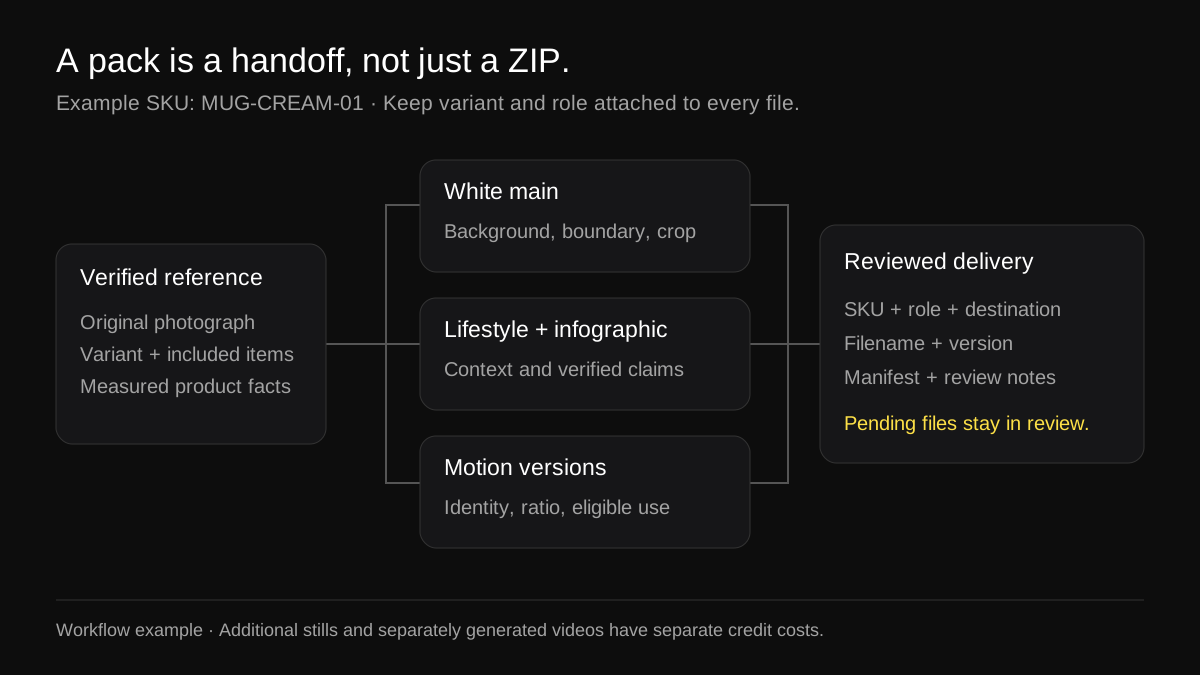
An organizational example. The diagram is not a claim that every illustrated asset is included in a single ZIP generation.
Define the roles before making the files
Write a short asset brief for the exact variant. For MUG-CREAM-01, the job might be a neutral main image, a lifestyle image showing the mug on a table, a dimensional infographic using verified measurements, and a short showcase loop. Those are four roles, even if some destinations can reuse the same file.
Swipe sideways to see every column
| Role | Buyer question | Key review |
|---|---|---|
| White main | What item am I buying? | Correct variant, truthful contents and destination-specific main-image rules |
| Lifestyle image | How might it look in a setting? | Plausible scale, accurate material and no confusion about included props |
| Infographic | What verified detail helps me choose? | Correct measurements and support for every written claim |
| Motion loop | What does the product look like in a brief movement? | Stable identity, useful framing and an eligible destination |
| Original photograph | What does the real item look like? | Preserved source and any channel requirement for an unedited photo |
Do not begin with "make six images." A count does not tell you whether you are missing a useful detail or producing three near-identical scenes. Define the question each image answers, then decide how many files are needed.
A marketplace destination is also more specific than its name. An Amazon main image and an Amazon secondary gallery image are different roles. A TikTok-oriented vertical creative is not automatically suitable for every TikTok Shop or advertising placement. Keep those distinctions in the brief.
Keep one product reference
Create a reference record before generating variations. Include the SKU, variant, source photo, included components, verified dimensions and facts you intend to show. If the mug capacity has not been verified, do not let a generated infographic supply a plausible number.
For the illustrative mug, the reference might say: cream glaze, one mug, handle on the viewer's right in the chosen source, no saucer included. Dimensions should come from an actual measurement or product specification. "Looks dishwasher safe" is not a substantiated claim.
Preserve an untouched original in a separate source folder. Use it to compare handles, rims, labels and color across the pack. A consistent style is useful, but consistency achieved by changing the real product is a failure.
If you sell several colors, make separate reference records. Do not approve a green variant using a cream variant's review sheet. A palette change can affect the apparent finish, printed label and contrast with the background, all of which need inspection.
Make channel-specific decisions explicitly
For Amazon, reserve the main-image role for the current main-image requirements. Keep lifestyle settings and explanatory graphics in their appropriate slots. The Amazon main-image review guide separates color, boundary and framing checks so an RGB result does not become a blanket approval.
For Shopify, plan the page's gallery as a sequence. Put the clearest product view before explanatory context, then inspect the actual theme's thumbnails and media layout. Keep proportions consistent enough to avoid awkward jumps between slides. A crop that looks good in a full-screen editor may not work in the theme's card.
For TikTok-oriented motion, plan a vertical composition and preview it with the actual placement's interface. A horizontal version is a separate framing decision. The five-second shot-plan guide explains why an aspect ratio is not a promise of duration eligibility or ad acceptance.
For Etsy, keep the real product photograph central to the listing. Etsy's current image guidance says images must accurately reflect appearance, color, condition, scale and materials. It also calls for at least one unedited photo of the actual item against a real background, with some product-type exceptions, and says to note AI-edited listing photos in the description. Review the current guidance for your item rather than treating generated scenes as a complete replacement for real photography.
Produce the main image first
Approve the product identity in the simplest composition before adding a setting or motion. A white main makes it easier to see whether the outline, quantity and color match the source. It is also a useful place to find input problems before paying for more variations.
The approval has to be specific. Record which file was inspected and what passed. "Looks good" gives the next reviewer no clue whether someone checked a handle opening, a label or only the background.
If the main is rejected because the product itself changed, stop the pack. Do not build lifestyle and motion variations around a reference you already know is inaccurate. Fix the source or generation choice first.
Add context without inventing product facts
A lifestyle image can answer a practical question about setting or use, but props can imply a bundle. For the mug example, a spoon or saucer should not make the offer appear to include items that are not sold with it. Review the composition and the accompanying listing copy together.
Keep scale plausible. A mug on a desk should not grow between images or look smaller than a nearby teaspoon. Generated surroundings are a creative treatment, not evidence of dimensions. Use a verified measurement or a photographed scale reference when size is important to the decision.
For an infographic, write the intended facts before making the layout. Check units, the direction of each measurement line, and whether a capacity claim describes the usable product rather than an assumed number. Avoid adding badges or certifications you cannot support. Use the infographic workspace as a production step after the factual brief is complete.
Build a manifest someone else can use
Use filenames to make mistakes less likely, then use a manifest to carry the information filenames cannot. A workable pattern is SKU_role_destination_ratio_version.ext. Keep the extension truthful; changing .png to .jpg in a filename does not convert the image.
MUG-CREAM-01/
  source/
    MUG-CREAM-01_original.jpg
  review/
    asset-manifest.csv
    main-image-review.csv
  delivery/
    MUG-CREAM-01_white-main_amazon_1x1_v01.jpg
    MUG-CREAM-01_lifestyle_shopify_4x3_v01.jpg
    MUG-CREAM-01_dimensions_gallery_1x1_v01.jpg
    MUG-CREAM-01_motion_tiktok_9x16_v01.mp4
This is a suggested handoff structure, not the folder layout promised by a ProductVisualAI ZIP. Rename and organize downloaded files in your own workflow as needed. Amazon's filename-based bulk image uploader has a separate identifier.variant.extension naming convention; convert the delivery names for that workflow instead of assuming these internal names satisfy it. If a file is awaiting review, keep it out of the delivery folder.
Download the sample asset manifest (CSV). It records SKU, variant, role, destination, ratio, filename, review state and notes. The example rows start as pending; they do not pretend that an illustrative file has been approved.
Use a new version when a file changes. Replace an old approved file only after the new one has been reviewed. Otherwise a teammate can upload a revision that inherited an old "approved" label without inheriting the old image's properties.
Work through a small credit budget
ProductVisualAI charges 1 credit for a still, 2 credits for a product video and 3 credits for a listing ZIP. The ZIP combines a white main and a motion asset. Do not assume that every asset in a multi-platform brief is included in that base pack.
Swipe sideways to see every column
| Planned production | Credits in this example |
|---|---|
| One white-main-plus-motion listing ZIP | 3 |
| One additional lifestyle still | 1 |
| One additional infographic still | 1 |
| Total before revisions | 5 |
| Optional additional video job for another composition or ratio | 2 more |
A second separately generated motion version would make this example 7 credits before revisions. The table is a production budget using current credit costs; it is not a claim that changing a filename or reusing a file incurs another charge. Reuse a reviewed asset where it genuinely fits, and budget a new render when the brief requires one.
Choose listing templates by role and destination after making the brief. The template should serve the job, rather than determining which claims you decide to place on the product.
Run the handoff review
Before creating the delivery ZIP, have the reviewer answer five questions:
- Does every file depict the exact SKU and variant in the manifest?
- Does each file have a defined role and a destination where its format and content are eligible?
- Have product identity, image boundaries, factual callouts and motion continuity been reviewed separately?
- Are pending and rejected outputs excluded from the delivery folder?
- Can another person identify the upload candidate without asking which of several nearly identical filenames is current?
Then open the actual archive. Check that it contains the intended files, that images and videos open correctly, and that there is no stale variant or duplicate "final-final" revision. This final inspection catches packaging mistakes that an individual image review cannot.
ProductVisualAI provides downloads. You publish through your own seller accounts; this workflow does not connect Amazon or Shopify OAuth or upload a pack into every marketplace automatically. After uploading, inspect each live listing or processed preview because destination cropping and playback can differ from the original file viewer.
When the pack is ready
A pack is ready when its roles are covered, its files have passed the relevant review, and its manifest matches the delivery archive. It is not ready simply because the ZIP downloads or because every image shares a polished background.
For a repeat launch, duplicate the brief and blank checklist rather than an old approval. Keep the organizational method, but verify the new product's facts and the destination's current requirements again.
Sources and scope
The hypothetical mug, folder structure, manifest and credit example were prepared for this guide; they are not a customer case study. Amazon's image requirements, Etsy's image guidance and TikTok's in-feed ad specifications describe different platform contexts. Follow the current rule for the exact surface you use. No sales uplift or acceptance guarantee is implied by organizing a pack this way.